

Skip to content

Your AI. Your data. Your computer.

Growth OX reads your mail, files and messages, picks out the few things that need you today, and writes the first draft of each next step. Your personal AI data stays on your computer by default, and you decide what gets connected or shared.

The first public version is not out yet

See pricing

Built for people who run their own work. Pick yours:

Pick your work and see your morning

These are the skills Growth OX starts you with, plus one draft that is waiting for your yes. Go ahead and try it: change the draft, approve it, then take it back.

I work as

Ready when you sit down

  1. Hearing calendar reminderPrepares reminders a week and a day before each hearing on the calendar.
  2. Notice and deadline trackingExtracts deadlines from incoming notice mail and lists them.
  3. Pleading draft checkFlags inconsistent dates, names and amounts in a pleading.
Waiting for your approvalEditingDoing it…DoneUndoneExample

Client status summary

Case file · opposing reply

Ready. If you approve, this is what I will do:

To
Ayşe Demir, client
Text
Dear Ms Demir, a short update on your case: the other side's reply arrived this week, and we will answer it before the next hearing. Nothing is needed from you for now. I will write again after the hearing.

Revising: “make it shorter”

Change the fields, or tell the assistant what you want.

Done: schedule the draft for tomorrow morning

You can undo for 8 seconds; after that, from History.

A record of what I did is in History.

Undone. Everything is as it was.

Ready when you sit down

  1. e-Invoice checkFlags missing fields and amount or VAT mismatches in incoming invoices.
  2. Filing calendar reminderLists filing and payment dates per client each week.
  3. Bank statement matching prepMatches statement lines to invoices and sets aside the unmatched.
Waiting for your approvalEditingDoing it…DoneUndoneExample

Missing document request

Month-end checklist · Kaya Ltd

Ready. If you approve, this is what I will do:

To
Murat Kaya, client
Text
Hello Mr Kaya, to close this month's books we still need the fuel receipts and the office rent invoice. Could you send photos of them by Friday? Thank you, and have a good week.

Revising: “make it shorter”

Change the fields, or tell the assistant what you want.

Done: schedule the draft for tomorrow morning

You can undo for 8 seconds; after that, from History.

A record of what I did is in History.

Undone. Everything is as it was.

Ready when you sit down

  1. Low stock alertWeekly list of products about to run out at the current sales rate.
  2. Late shipment follow-upFinds shipments handed over but not delivered.
  3. Weekly sales summarySums revenue, return rate and best sellers in three lines.
Waiting for your approvalEditingDoing it…DoneUndoneExample

Return and question replies

Store message · return request

Ready. If you approve, this is what I will do:

To
Elif, customer
Text
Hi Elif, thank you for telling us. The jacket is within the return period, so we have made a free return label for you. Your refund goes out as soon as the parcel reaches us.

Revising: “make it shorter”

Change the fields, or tell the assistant what you want.

Done: schedule the draft for tomorrow morning

You can undo for 8 seconds; after that, from History.

A record of what I did is in History.

Undone. Everything is as it was.

Ready when you sit down

  1. Weekly publishing calendarBuilds a suggested publishing order from ready content and open days.
  2. Comment digestGroups new comments into topics and questions and suggests reply drafts.
  3. Post-video performance note48 hours after publishing compares views and watch time with earlier videos.
Waiting for your approvalEditingDoing it…DoneUndoneExample

Collab offer reply draft

Mail · collaboration offer

Ready. If you approve, this is what I will do:

To
Deniz, brand partnerships
Text
Hi Deniz, thank you for thinking of my channel. I would be glad to look at a sponsored video next month. Could you send the brief and the budget range, so I can see whether it fits my audience?

Revising: “make it shorter”

Change the fields, or tell the assistant what you want.

Done: schedule the draft for tomorrow morning

You can undo for 8 seconds; after that, from History.

A record of what I did is in History.

Undone. Everything is as it was.

Ready when you sit down

  1. PR and issue digestCollects PRs and issues waiting for you in one morning list.
  2. Release note draftDrafts release notes from PRs merged since the last release.
  3. Failing build summaryReads a failed CI run's log and summarises the likely cause.
Waiting for your approvalEditingDoing it…DoneUndoneExample

Freelance invoice draft

Project log · this month

Ready. If you approve, this is what I will do:

To
Northwind Studio, client
Text
Invoice for this month: the checkout redesign and the login fixes, with the hours taken from your project log. Payment is due within two weeks. Thank you for another good month of work.

Revising: “make it shorter”

Change the fields, or tell the assistant what you want.

Done: schedule the draft for tomorrow morning

You can undo for 8 seconds; after that, from History.

A record of what I did is in History.

Undone. Everything is as it was.
The names are made up. In the app this is your own mail, and nothing goes out until you approve it.

It works with the tools you already have

Your AI

  • Claude
  • ChatGPT
  • Gemini
  • Ollama

Your apps

  • Gmail
  • Outlook
  • WhatsApp
  • Google Drive
  • Paraşüt
  • Trendyol
  • YouTube
  • GitHub

Growth OX reads your mail, chats, files and seller panels through the browser you are already signed in to. The product names belong to their owners, and Growth OX is not affiliated with any of them.

Everything that comes in, on one page

  1. One page for everything that came in

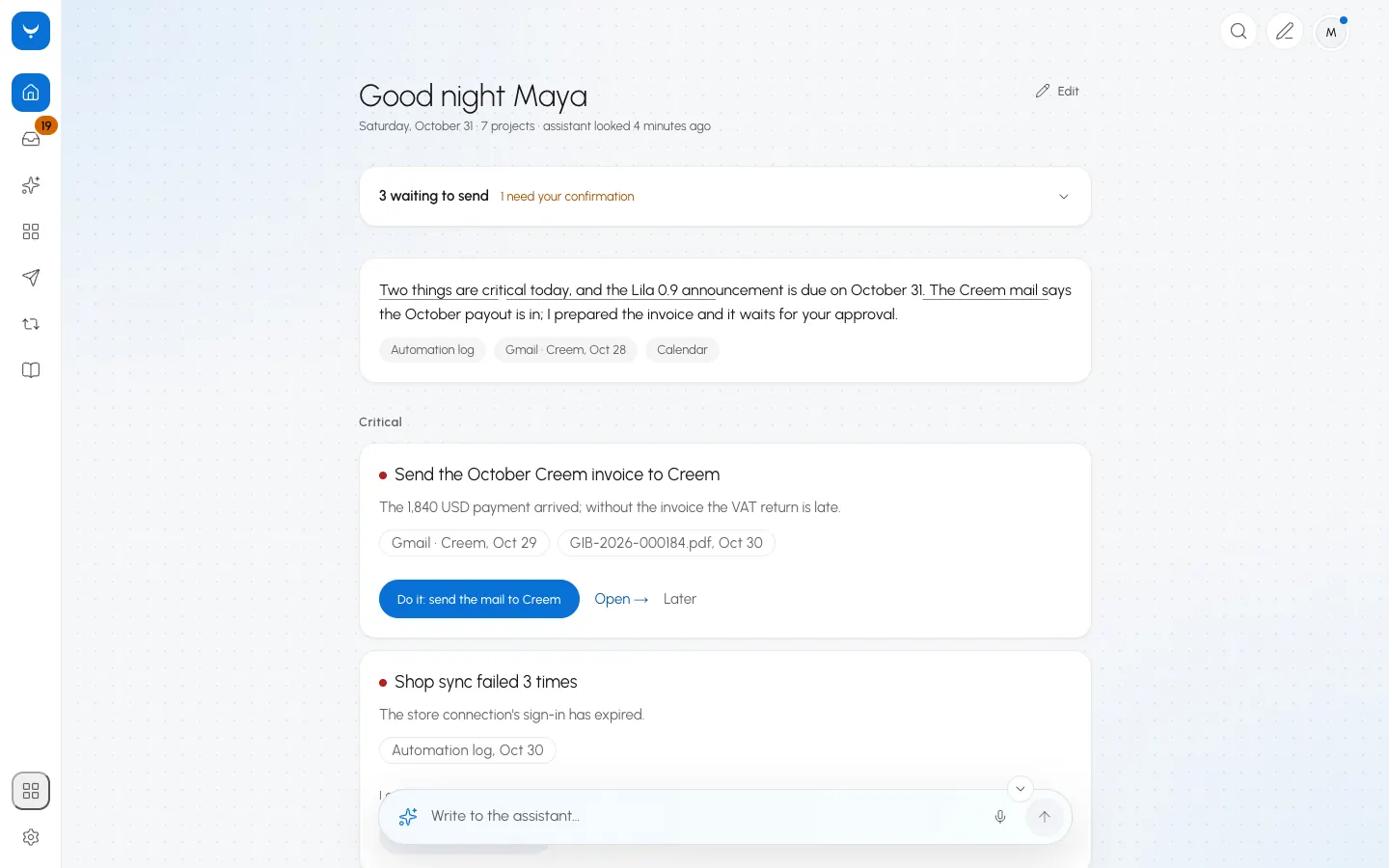
    Mail, messages, files, calendars and seller panels meet on the Today page. The assistant marks what needs you and links every item to where it came from, so you can always check the source.

    A lawyer sees this week's hearings next to the notice mail. A shop owner sees returns next to low stock.

  2. Your AI runs where you choose

    Pick a local model on your Mac, the Claude or ChatGPT subscription you already pay for, or your own API key. A local model can still search the web and use your computer, and it asks you before each step that reaches outside. With a local model your work stays on your computer, and there is no Growth OX server in between.

    The app measures your Mac and tells you which local models fit. On a 16 GB Mac it recommends Qwen3 8B.

    • Your subscriptionClaude Code or Codex, installed and signed in by you.
    • Your API keyAnthropic, OpenAI, Gemini, Mistral and more. The key stays in your Mac's Keychain.
    • A local modelQwen3 8B through Ollama on a 16 GB Mac. Your text is processed on the computer.
  3. It remembers what you told it

    Your goals, decisions and notes live in one place, and the assistant reads them before it answers. Point it at a folder and it sorts what is inside into project areas, which stay current as the files change.

    A lawyer's folder becomes one area per client and case. An accountant's becomes one area per client.

  4. Press Yap. Nothing goes out until you say yes.

    Before Yap (Do it) does anything, it shows you exactly what will happen. You can edit it, ask for a change or approve it. Posts, replies, e-mails and payments all wait for you, and every decision goes into the record.

    You can set up a routine in one sentence, for example: "every Monday morning, sum up the comments nobody answered and tell me."

    How approvals work

Your AI. Your data. Your computer.

Your personal AI data stays on your computer by default. You decide what gets connected or shared.

Only this computer

The model, your memory, your files and your tools run on this Mac. The app blocks its own connections to the internet; licence and update checks wait, and the licence keeps working offline for 37 days.

Local AI + connected tools

The model and your memory stay on this Mac. A connected service such as Gmail or GitHub receives only the data of an action you approved.

Cloud-assisted

A cloud model runs only when you choose one. Before each call you see which provider gets the request and what kind of data it carries. Personal details are masked first, and a project set to Only on this computer never goes to the cloud.

Network log: every connection the app makes, with its purpose and time. In Only this computer the list stays empty.

Local models are not as strong as the largest cloud models on long automations with many steps. The app tells you where that matters.

Facts you can check in the app

Growth OX is new, so there are no reviews to show yet. These are things the app does today.

16 GB
of memory is enough for a recommended local model.
19
languages in the app today. Every screen is translated, and the app opens in yours.
15
visual styles to choose from.
14
days free, every feature, no card.
Your yes
comes before anything goes out in your name.
No account
and no tracking. Your notes and memory live on your Mac.

Your agents start with skills for your work

Tell Growth OX what you do when you set it up, and your agents start with skills written for that work. They run on their own, show every step, and ask you before anything goes out.

  • Turns a file's latest movements into a plain draft update for the client.

    What it does

    1. Read the file's latest documents and notes.
    2. Write a 5-line plain-language status draft the client can follow.
    3. Add no legal opinion or outcome prediction; show you the draft and ask before sending.

    Asks you every time

  • Gathers what is missing from a client for the period and drafts a polite request.

    What it does

    1. Compare the client's period folder with the previous period (invoices, statements, payroll).
    2. List what is missing and draft a short request to the client.
    3. Ask for approval before sending.

    Asks you every time

  • Drafts a confirmation message to the buyer for next-day viewings.

    What it does

    1. Find viewing entries on tomorrow's calendar.
    2. For each, draft a short confirmation with address, time and meeting point.
    3. Ask for approval before sending.

    Asks you every time

  • Drafts replies to returns and questions following your policy.

    What it does

    1. List new return requests and customer questions.
    2. Draft a short reply for each using your return policy note.
    3. Ask for approval before posting any reply to the panel.

    Asks you every time

  • Builds a short summary and action list for the client from the session notes.

    What it does

    1. Read the session notes or recording.
    2. Write what was discussed, the client's agreed steps and dates in 5 points.
    3. Show you the draft and ask before sending to the client.

    Asks you every time

  • Groups new comments into topics and questions and suggests reply drafts.

    What it does

    1. Read new comments on recent videos.
    2. Separate questions, praise and complaints; draft replies to questions.
    3. Never post a comment without approval.

    Asks you every time

  • Collects PRs and issues waiting for you in one morning list.

    What it does

    1. List PRs and issues assigned to or waiting on you.
    2. Write the wait time and last comment for each.
    3. Comment or merge nothing; list only.

    Asks before anything goes out

Add your own by describing a routine in one sentence, or keep skills in a folder of your own. Nothing changes until you have seen the difference.

Your Mac in the middle, the rest around it

Growth OX runs on your Mac. Your phone, your browser and your folders connect to it there.

  • Mac

    The app, your data and your local models live here.

  • Phone

    Pair it with a QR code and confirm with your fingerprint or screen lock. It reaches your Mac over your own private network.

  • Browser

    Gmail, Outlook, WhatsApp and seller panels are read through the browser you are signed in to.

  • Files

    Drop in a file to convert or trim it: an image, a recording, a video, a document, a spreadsheet, subtitles or an archive. The work happens on your computer.

Say it out loud. Decide from your phone.

Hold the shortcut, talk, and let go. The assistant hears you even while the app is in the background. When something needs your decision, your phone shows it and your fingerprint confirms it.

  1. YouWhich hearings do I have next week?

    Growth OX · Lawyer

    Starting: Hearing calendar reminder

    Prepares reminders a week and a day before each hearing on the calendar.

15 looks. Pick the one that feels like yours.

A style changes the whole app, from type and colour to how things move. These are real screenshots of the same Today screen.

The Today screen in the Flow style, Light.

A morning with Growth OX

From opening the app to the first approved reply, as it looks on a Mac.

A morning with Growth OX

Three steps to get started

  1. Download Growth OX and open it.
  2. Choose your AI: a local model, your subscription or an API key.
  3. Tell it your profession and connect the tools you use.

Simple pricing

  • Perpetual licence: $299 once. The version you buy is yours to keep, with 12 months of updates.
  • $159 for twelve months, updates included, up to 2 computers.
  • $99 for six months, updates included, up to 2 computers.

Try every feature for 14 days first. No card.

Not right for you? Ask for your money back within 30 days.

If you stop renewing, the version you have keeps working. You only stop getting new versions.

See all plans

Questions

Does my data leave my computer?

With a local model your work stays on your computer, and there is no Growth OX server in between. With a cloud provider, your text goes straight to that provider and never to us. The app checks your licence about once a week with a hash of your device id and downloads updates; neither sends your work. There is no account and no tracking.

What does it cost beyond the licence?

Nothing more from us. Growth OX comes with no AI usage of its own: use a free local model, the Claude or ChatGPT subscription you already have, or your own API key, at that provider's prices.

How hard is setup?

Download, open, choose your AI and your profession. A local model also needs Ollama and at least 6 GB of free disk space; the app checks your Mac and tells you what fits.

Is it for my profession?

If you run your own work, yes. Setup offers starting points for Lawyer, Accountant / financial adviser, Real-estate agent, E-commerce seller, Health practice, Consultant / coach, Designer / architect, Teacher / tutor, Restaurant / café, Developer, and Content creator, plus a general one. The assistant prepares and tracks; the final call is always yours.

What if my Mac has 16 GB of memory?

That is enough. The app marks each local model as fits, borderline or does not fit, and on a 16 GB Mac it recommends Qwen3 8B. You can also skip local models and use your subscription or an API key.

Can it send something without me?

No. Posts, replies, e-mails, publishing and spending wait for your approval. You can approve, edit or refuse, and each decision is recorded.

What happens if I stop renewing?

The version you have keeps working, with all your data. You stop receiving new versions until you renew.

Is there a Windows or Linux version?

Not yet. Both are coming, and the release feed announces them. There is no e-mail list to join.

Try it with your own work

The first public version is not out yet

See pricing

Notes for people who run their own work

All articles